
You can print eBay shipping labels on your Rollo in two ways: connect your eBay store to Rollo Ship and buy discounted labels there or buy the label on eBay and print it in 4x6 format. Both methods are covered below.
Option 1: Connect your eBay store to Rollo Ship
On a computer, open a browser and log in to Rollo Ship.
1. Go to Connections, then Selling Channels.
2. Click eBay and follow the on-screen instructions to sign in and approve the connection.
3. Your eBay orders will appear in the Orders tab. Buy and print labels from there.
4. If you connect through the website, the connection also shows up in the Rollo mobile app.
If the eBay connection keeps spinning and never finishes
This usually happens in the Rollo mobile app. Try these steps in order:
1. Uninstall the Rollo app, reinstall it, and try connecting again.
2. If it still spins, connect through the website instead.
Option 1: Log in to Rollo Ship on a computer ---> go to Connections ---> Selling Channels ---> eBay
Option 2: No computer? Open ship.rollo.com in your phone's browser, tap the browser menu, and choose "Desktop site" (or "Request desktop site"). Then connect from there. If the website also fails, clear your browser cache and cookies, close and reopen the browser, or try an incognito window or a different browser.
3. Turn off any VPN on your phone or computer.
If eBay orders stop showing up in Rollo Ship
1. Log in to Rollo Ship.
2. Click the reload icon next to your profile name, then click Update All Markets.
3. If orders still do not appear, go to Connections, then Selling Channels. Click Edit next to eBay and delete the connection.
4. Log out of Rollo Ship, log back in, and reconnect eBay under Connections, then Selling Channels.
Option 2: Print a label you bought on eBay
1. In eBay, go to your orders and open the label you want to print.
2. Before you buy or print the label, look for the option to change the label format to 4x6. Select it.
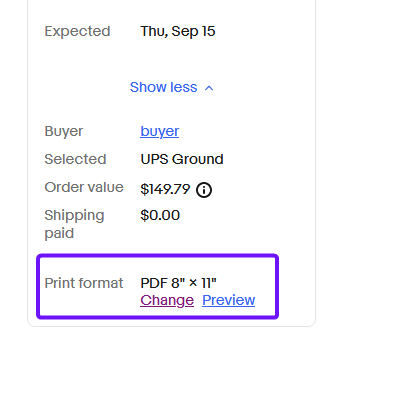
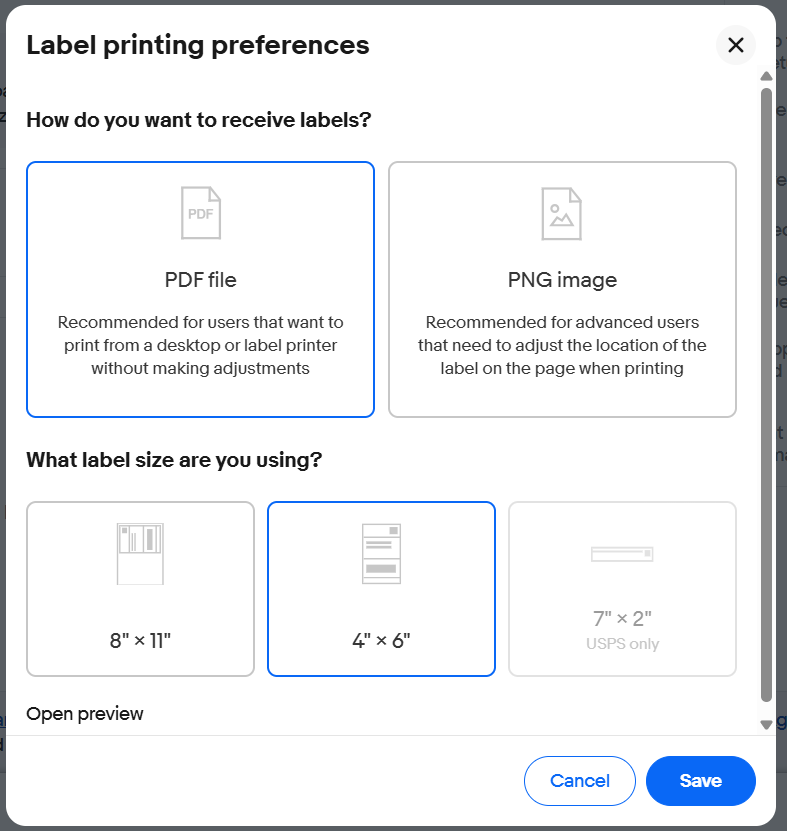
3. Print the label and choose your Rollo as the printer.
Notes:
*Once a label is set to 4x6, it prints correctly on your Rollo. To reprint labels with originally 8" x 11" format, simply go back to the order, reprint the label, and the new 4" x 6" format should apply.
*The eBay mobile app does not have a printer setting. Download or open the label from the eBay app, then print it with your Rollo from your phone’s Files app or PDF viewer.
*Some international labels (including Guam and Puerto Rico) may not offer the 4x6 option. It depends on the carrier. If there is no 4x6 option, you can crop the label to 4x6 in a PDF editor, or buy the label through Rollo Ship instead. Rollo Ship supports international labels and customs forms.
Still stuck? Chat with our support team, and we will walk through it with you.