
FedEx® is a connect-your-own-account carrier in Rollo Ship for U.S. accounts. Connect your FedEx account once, and FedEx services appear on the Summary screen next to the built-in USPS and UPS® services. You ship on your own negotiated FedEx rates, with no Rollo discount, and pay for FedEx labels from your prepaid Rollo Ship Wallet.
Key points
- USPS and UPS® are built in for U.S. accounts, with discounted rates and no carrier account needed. FedEx works as connect-your-own in both the U.S. and Canada.
- No label fee on your first 200 labels with any carrier, including FedEx. Then 5¢ per label, down to 1¢ with Rollo Rewards.
- FedEx Ship Manager is not needed. Buy the label in Rollo Ship and print it on any compatible printer.
- No subscription, no monthly fee and no shipping minimum.
How to connect FedEx
- Sign in at ship.rollo.com (or create a free account).
- Open your Connections - Shipping Carriers.
- Under Or add a new shipping carrier, choose Connect an Existing FedEx Account.
- Fill in the form: an Account Alias, your FedEx shipping address, and your FedEx Account No (you can find it on your FedEx billing statement). Then click CONNECT.
- Start a shipment with + CREATE QUICK SHIPMENT. FedEx services now show on the Summary screen next to the built-in carriers.
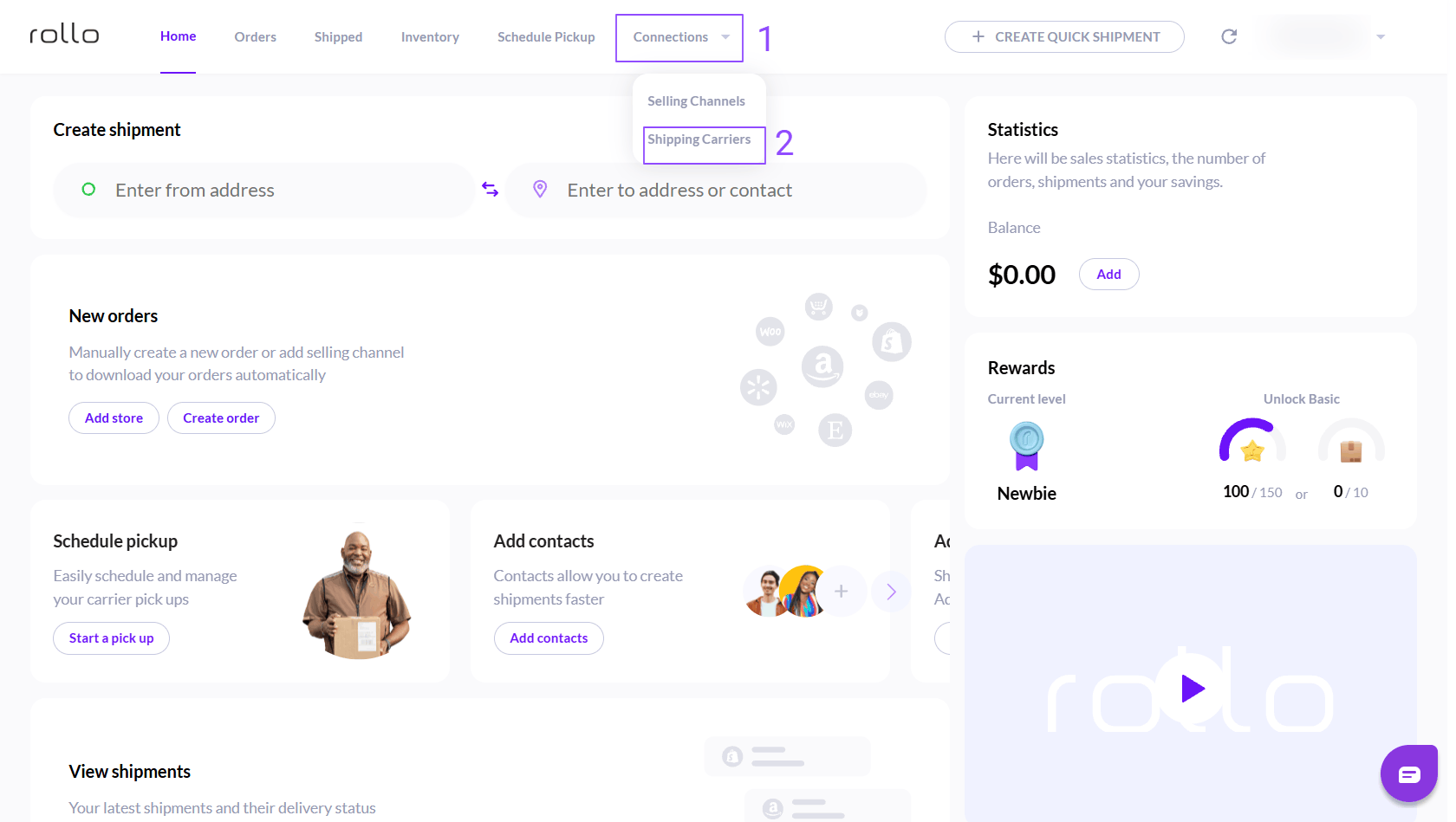
Open Connections, then Shipping Carriers.
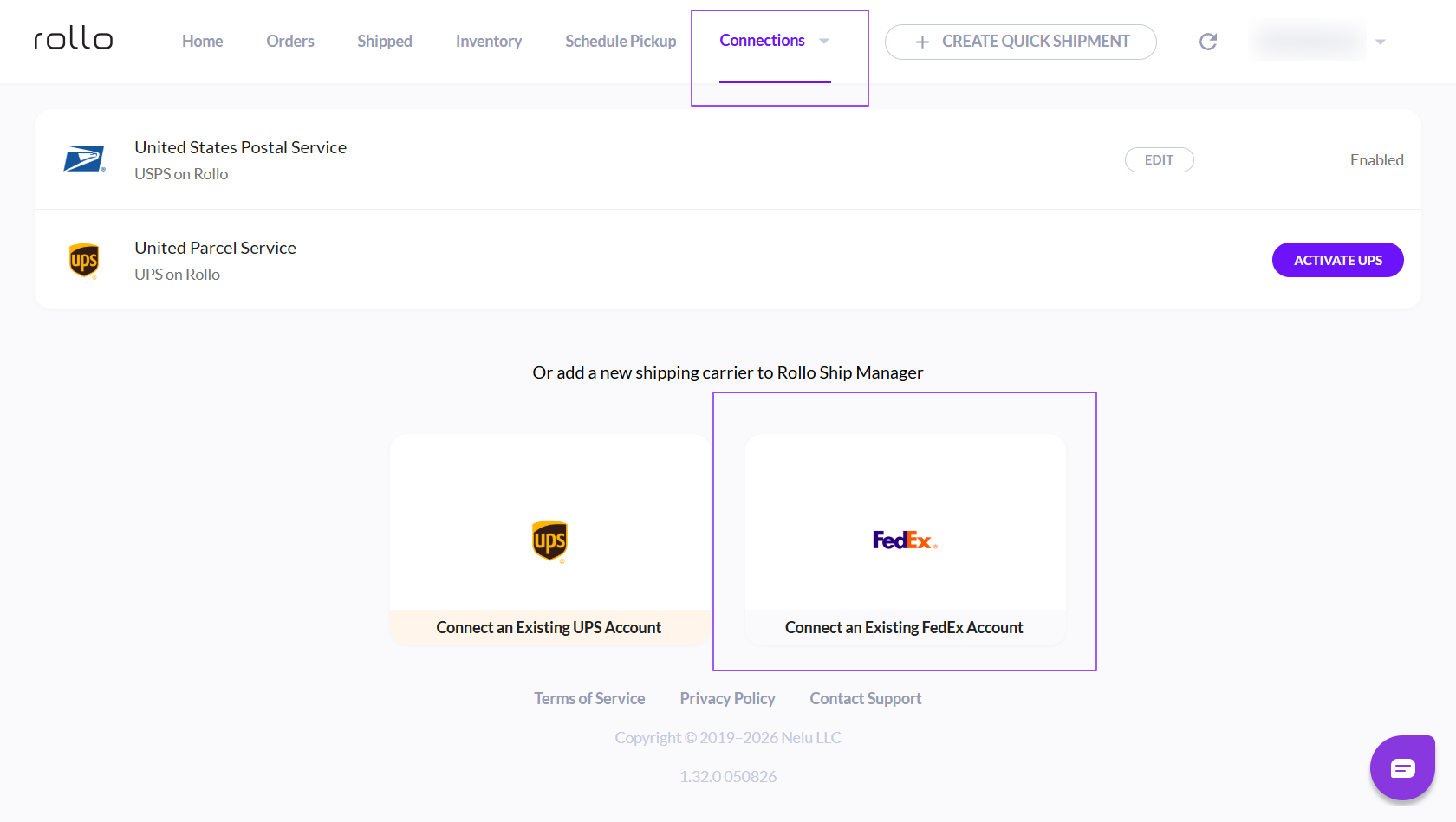
Choose Connect an Existing FedEx Account. The built-in carriers listed depend on your account country.
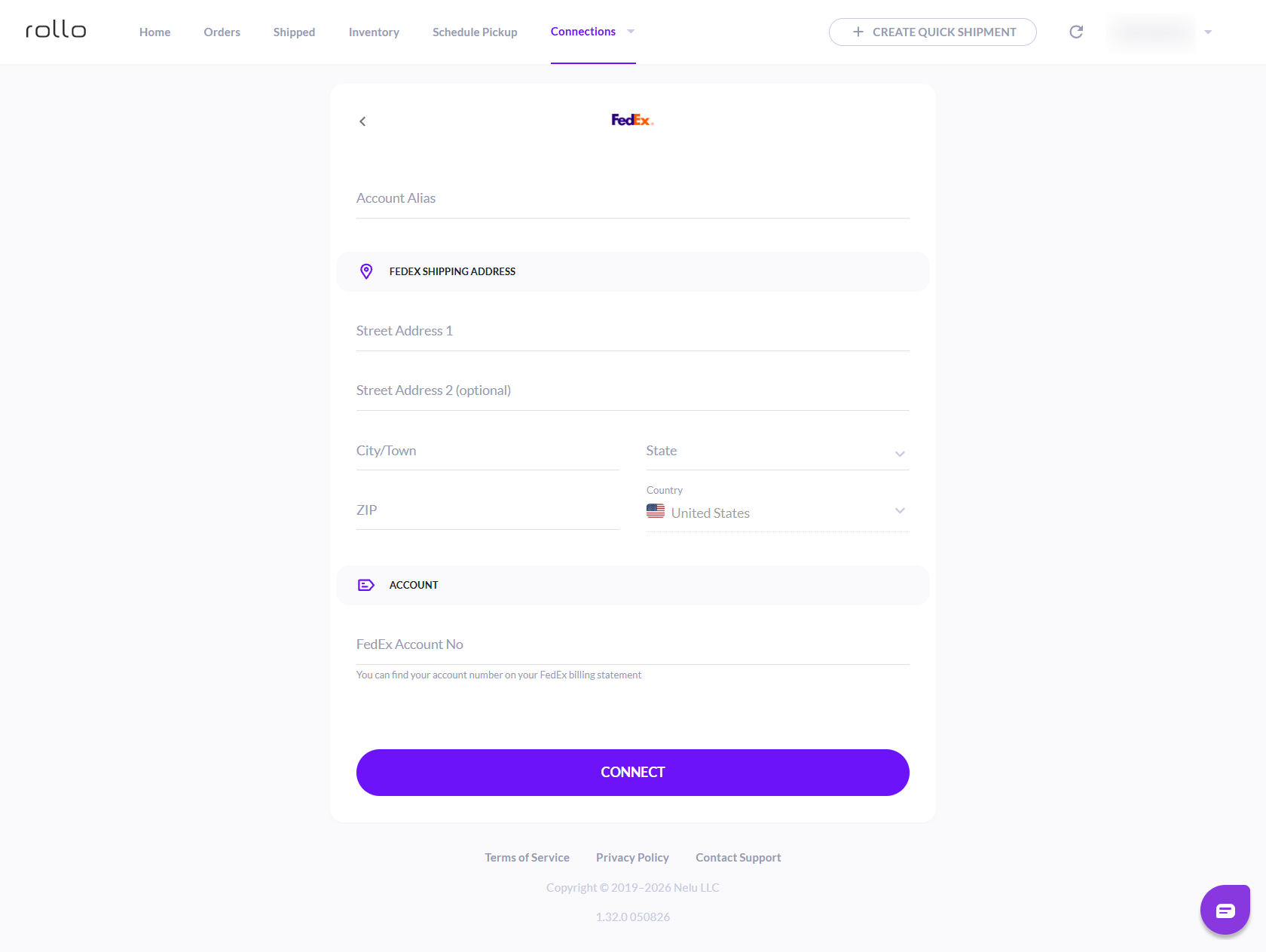
Enter your FedEx account details and click CONNECT.
What FedEx shipments cost
- FedEx postage: your own negotiated FedEx rate for the destination, weight, dimensions and service you choose. Rollo Ship does not resell or discount FedEx rates. You pay it from your prepaid Rollo Ship Wallet when you buy the label.
- Rollo Ship label fee: no label fee on your first 200 labels with any carrier. After that it's 5¢ per label, down to 1¢ with Rollo Rewards: 5¢ at Newbie and Basic, 3¢ at Pro, 2¢ at Expert, and 1¢ at VIP.
A carrier can re-rate a label after purchase if the actual weight or dimensions differ from what you entered. Every FedEx shipment earns Rollo Rewards points. Full cost breakdown: How much does Rollo Ship cost?
Services, printing and pickups
Which ground and air services show up depends on the lane and on what your FedEx account is authorized to sell. Connect the account once, then use FedEx when it is the right service for the shipment, or buy a built-in carrier when it is not.
Buy the label in Rollo Ship and print the 4x6 label on any compatible printer, including the printer you already own.
Pickups: because you connect your own FedEx account, you book FedEx pickups with FedEx. Pickup fees depend on your FedEx account terms.
FAQ
Do I need my own FedEx account?
Yes. FedEx is connect-your-own in Rollo Ship. USPS and UPS® are built in for U.S. accounts; FedEx needs an account you connect. No FedEx account yet? You can open one on fedex.com and connect it afterwards.
Is FedEx Ship Manager required?
No. Buy the label in Rollo Ship and print it directly to any compatible printer.
How do I pay for FedEx labels?
From your prepaid Rollo Ship Wallet, at your own negotiated FedEx rates. Rollo Ship adds its label fee only after your first 200 labels.
Does Rollo Ship discount FedEx rates?
No. FedEx uses your own negotiated rates, with no Rollo discount.
Why is a FedEx service missing?
Your FedEx account or the lane may not allow it. Rollo Ship shows only what your connected account can sell on that route. See Missing rates or service not available.
Ready to ship? Compare live rates and create your next shipment.